
Platform
One system of record, from first contact to final invoice
Everything a project touches — the request, the client’s answers, the requirements, the design, the price, the delivery, every document that leaves the building and the invoice that closes it — lives in one gated pipeline with one audit trail.
AI intake
An intake that interviews like an engineer
The public request page accepts plain language, voice and file attachments — including scans, stamped copies and phone photos, which are read for you. The assistant works through ten scoping topics, shows how far it has got, and returns a feasibility read with a timeframe and a budget range you can see the derivation of.
- Text, voice (ASR) and drawing / spec / scan uploads with OCR
- Ten scoping topics tracked live — goal, users, hardware, integrations, compliance, scale, logistics, timeline, budget
- Instant estimate with the task-by-task breakdown behind it
- Region detection → the right currency and rate card
- Per-organisation branded intake links; your own staff get the same ten questions internally
-
The client’s own words
Text, voice or drawings
Scans and phone photos too
-
Ten scoping topics
Goal, users, hardware, integrations, compliance, timeline, budget…
-
Scope · timeframe · budget range
With the breakdown behind it
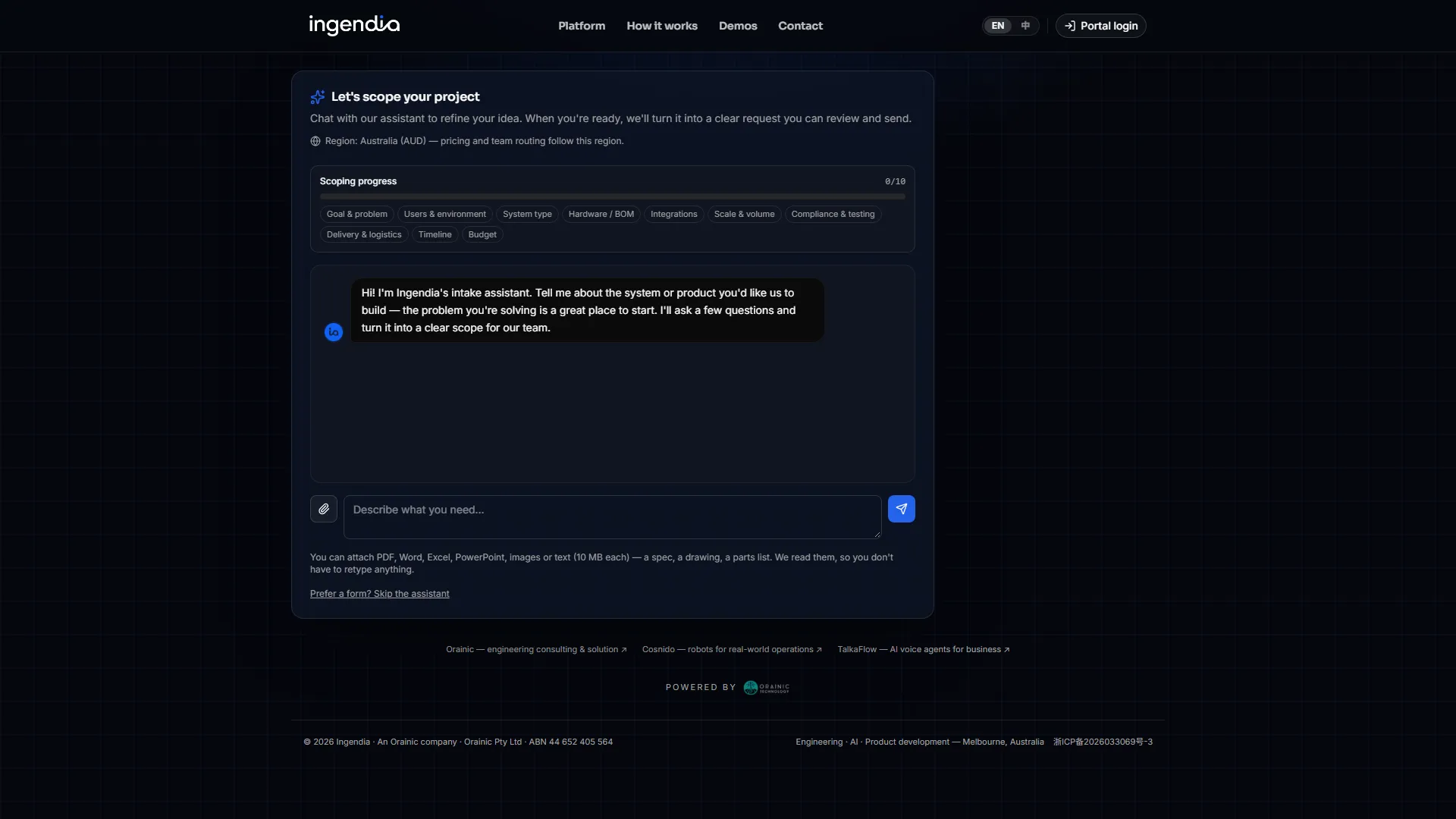 See the real screenAn intake that interviews like an engineer
 Client collaboration
The questions only the client can answer, on one link
Work stalls on the client, not on you: a nameplate photo, a switchboard shot, a yes or no on a scope boundary. A client pack sends those as one unguessable link — the client answers on a phone without an account, and every answer sits against the question it answers.
- No account and no token that dies over the weekend — the link stays open until you revoke it
- Photos attach to the specific question they answer
- The page opens in the sending organisation’s language
- You are emailed the moment the client submits
- An answer reaches §2 only when someone accepts it
- Import the questions a document already asks, instead of retyping them
-
Questions only the client can answer
A nameplate photo
A yes or no on scope
-
One unguessable link
No account, answered on a phone
Photos attach to their question
-
A person accepts
Only then does the answer reach §2
You are emailed the moment the client submits.
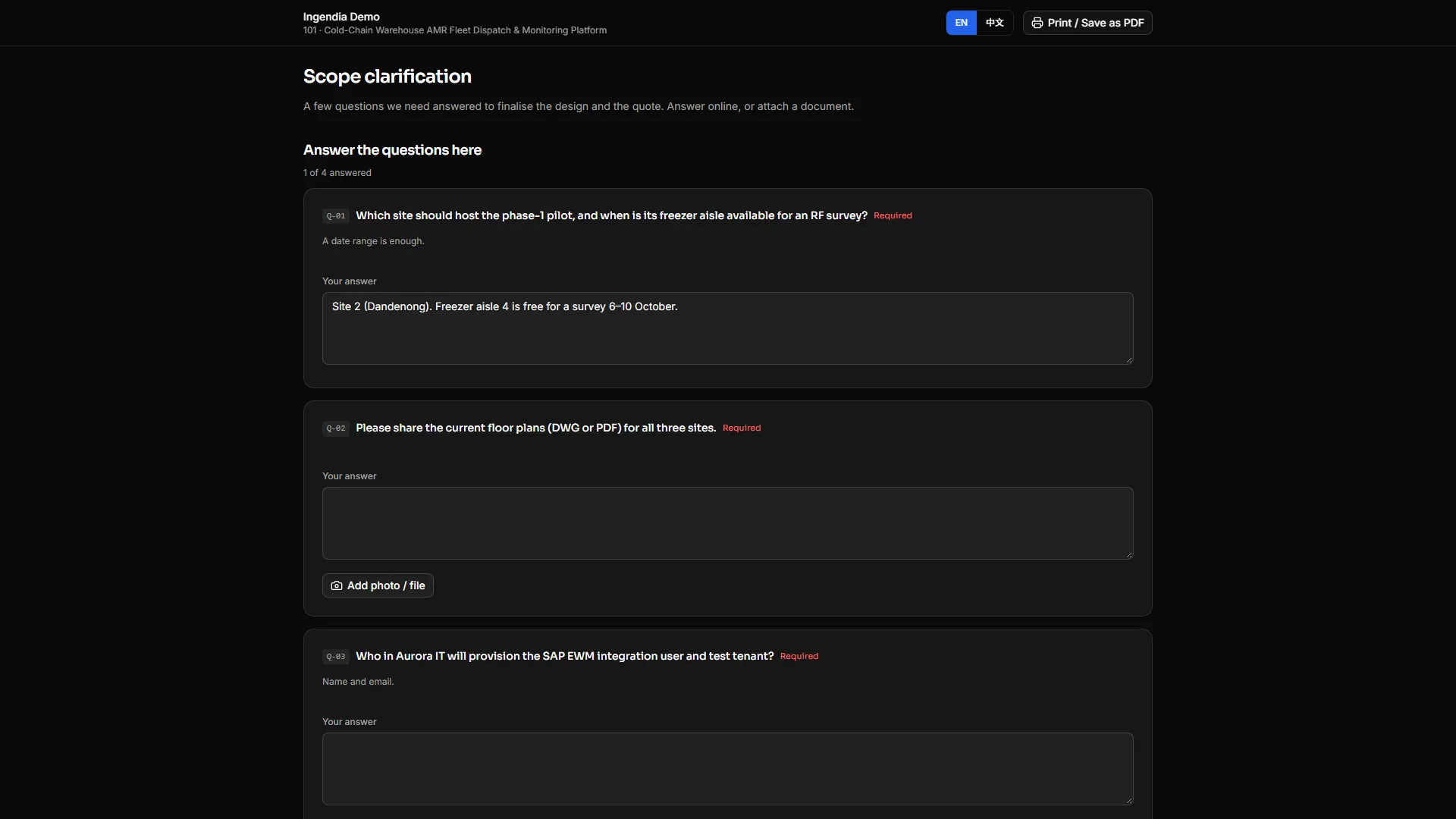 See the real screenThe questions only the client can answer, on one link
 Confidentiality
An NDA the client signs on their phone
Raise a mutual NDA against a customer — optionally a project — and send it as a secure link. The client checks their details, reads the terms and signs on any device; your countersignature executes it. The terms and your side of the agreement cannot be edited by the client.
- Drawn or typed signature, no account needed
- A random signing link, valid for 14 days, that can be revoked or reissued — reissuing kills the old one
- At signing, the client’s details and the agreement text are frozen and hashed
- At countersignature, the executed PDF — both signatures and an execution certificate — is generated once, hashed with SHA-256 and stored; every download is that file
- Every step is logged: sent, opened, signed, countersigned, executed, downloaded
- Your firm’s own lawyer-approved template and signatories, set up per firm
-
Raise a mutual NDA
Against a customer, optionally a project
-
A secure signing link
Emailed or copied
-
The client signs on any device
Drawn or typed, no account
-
Your countersignature executes it
-
Executed PDF, stored
SHA-256 and an execution certificate
Every later download is that stored file — it is never regenerated.
Requirements engine · §2
Requirements that trace, version and never silently rot
The brief and the answers to the open questions become confirmed customer needs (CND), which derive numbered functional and non-functional requirements with a live traceability matrix. AI proposes; engineers review a structured diff and accept — nothing overwrites without a decision.
- Statement of work + answers → customer needs → FR / NFR, in one cascade
- Each review reads only its direct upstream — no drift back to a superseded brief
- Reviewed AI revisions shown as was / now, accepted or rejected per item
- PM sign-off baselines the stage; later edits flag it stale
-
Brief + client answers
-
Confirmed customer needs
Drafted by AI, confirmed by you
-
Functional & non-functional requirements
Numbered, one by one
Every requirement traces back to the need it serves
AI revisions arrive as was / now, accepted or rejected line by line.
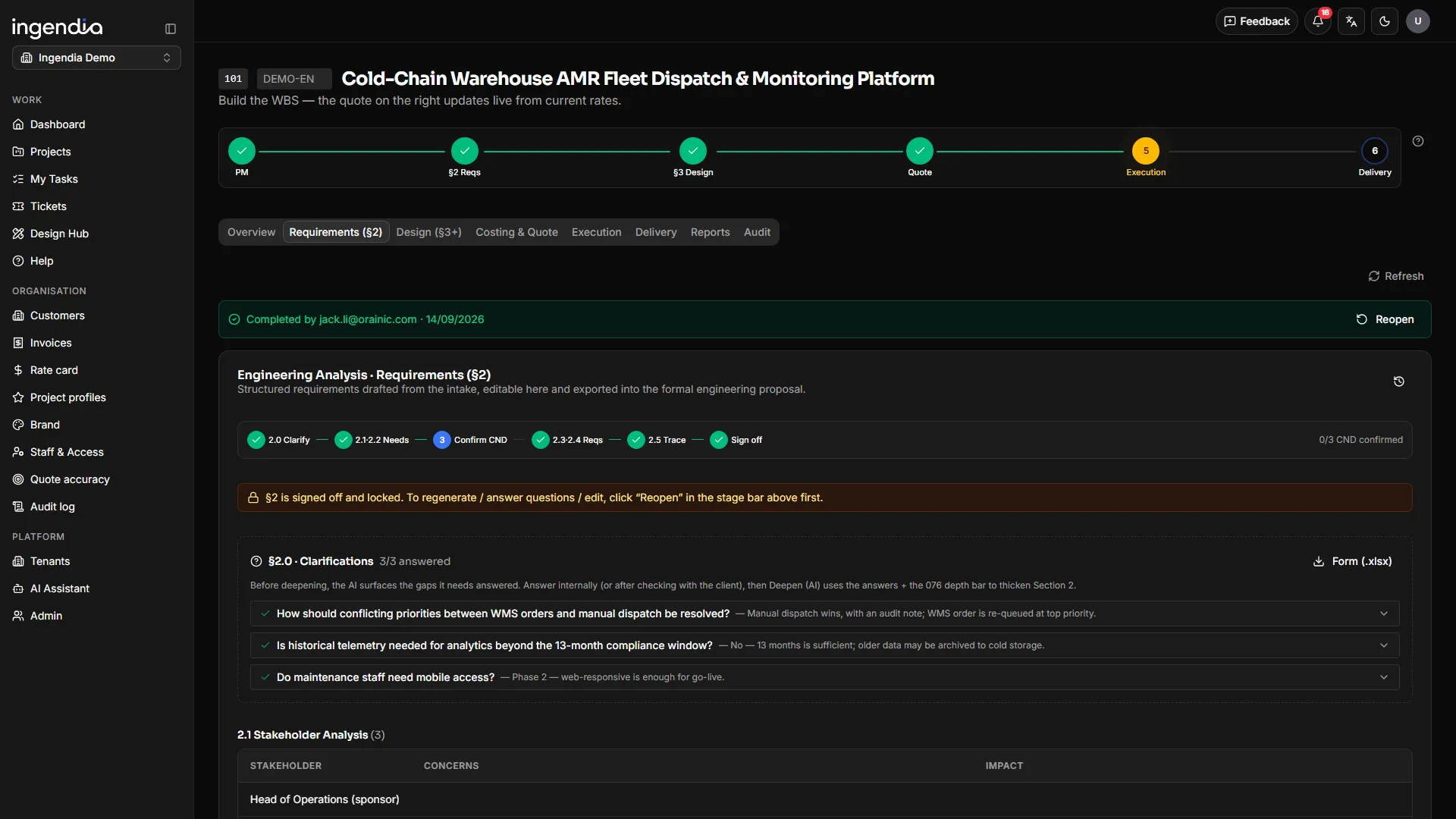 See the real screenRequirements that trace, version and never silently rot
 Design engine · §3
Specialist designs, grounded in your approved work
Ingendia detects which design disciplines the project needs, assigns leads, and drafts each discipline’s design — retrieving from your library of signed-off past projects so drafts start from precedent, not from a blank page.
- Nine design disciplines: systems, industrial design, mechanical, infrastructure & test facility, electrical & electronics (PCB included), firmware, software, AI / data, integration & comms
- Work breakdown and staff specialties use a finer fourteen-way split, so PCB, front-end or database work is priced as itself
- Retrieval-grounded drafting from approved past work, scoped to your organisation
- Per-discipline leads, review dialogs and revision history
-
Signed-off §2
Your approved past work
-
The disciplines this project needs
Picked from nine: systems, mechanical, electrical, firmware, software…
-
A draft per discipline
-
The discipline lead refines and approves
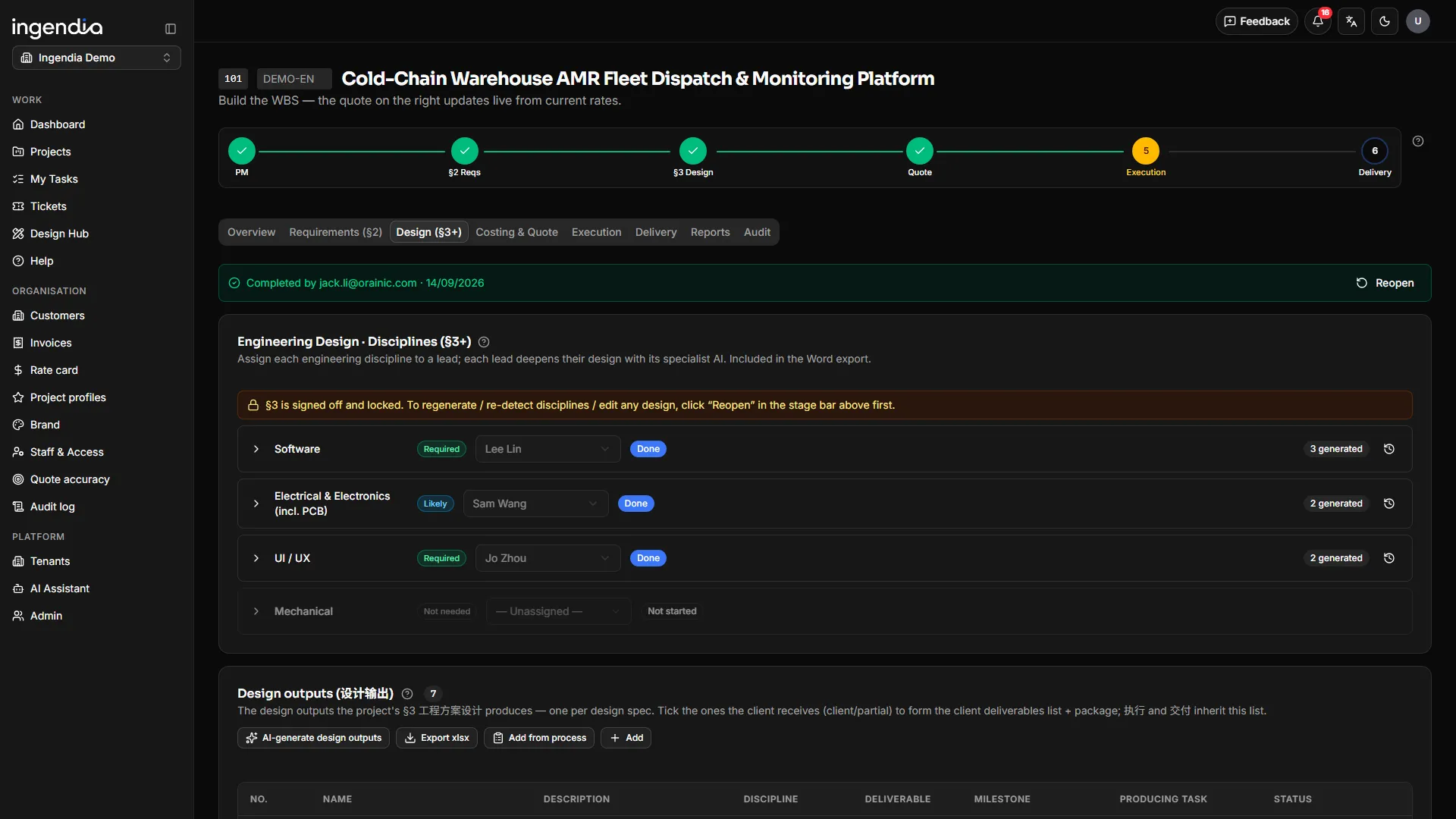 See the real screenSpecialist designs, grounded in your approved work
 Quoting
Prices that stand on the analysis, not on a hunch
The WBS prices itself from your rate card, staff classifications and BOM — with an explicit AI-automation share per task. Freeze produces a versioned quotation, with its lines, locked to the exact §2/§3 baselines it was priced on.
- Rate-card × classification pricing, materials with markup
- Fifteen cost categories — ten for materials, plus testing, site, travel, training and IP on their own lines, broken out on the quote
- Multi-currency (AUD · CNY · USD) by client region; AI share per task with optional shared savings
- A payment schedule on the quote; commercial revisions — discount, dropped line, terms — without re-signing §2/§3
- Frozen quotes re-flag if the analysis moves underneath them
-
WBS × rate card
+ BOM
-
Frozen, versioned quote
AI share shown per task
Locked to the §2 / §3 it was priced on
-
Proposal PDF
§2 + §3 report
Priced workbook
Travel, testing, site, training and IP each get their own line. Each document is built for the audience allowed to see it.
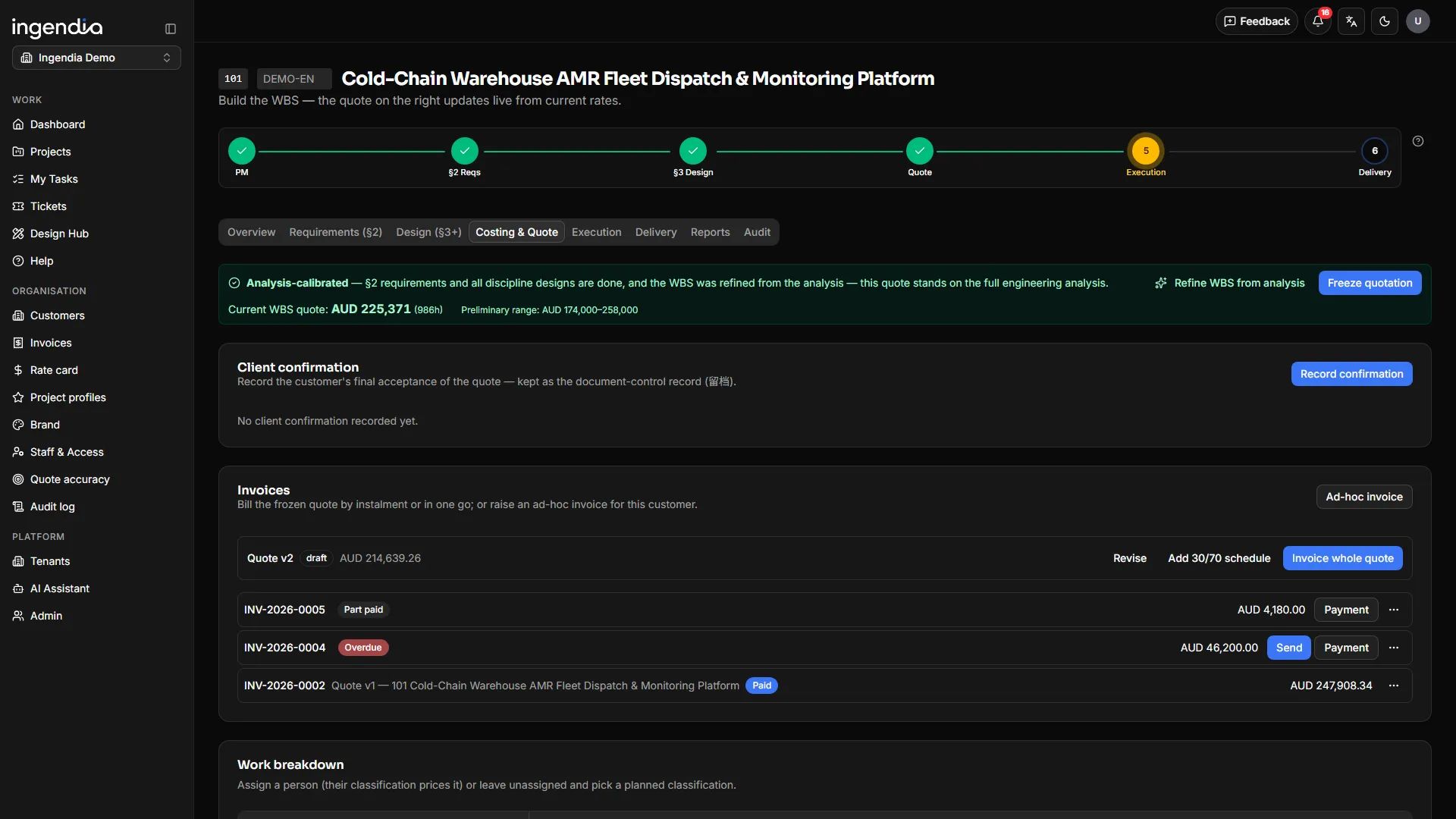 See the real screenPrices that stand on the analysis, not on a hunch
 Delivery
Delivery on a board, against the promise
Milestones, Gantt and hour-level variance against the frozen quote. Design outputs are generated from §3 and owned by named engineers, a task can be shared between several people with their own hours, and the delivery pack is reviewed before it leaves.
- Milestone cockpit, draggable Gantt and quoted-vs-actual variance
- Design outputs grouped by milestone, each with an owner and its attachments
- Multi-person tasks with per-person shares and share-weighted pricing
- One-click delivery pack (ZIP), with a re-review gate on every generated file
- A weekly snapshot of task and milestone state, stored from the first week
- Calibration loop feeds actuals back into estimating
-
The frozen quote
The baseline delivery is held to
-
Delivery board
Milestones and a draggable Gantt
Hours booked per task
-
Quoted vs actual
A slip shows up this week
Delivery pack
Generated files reviewed first
Every design output has a named owner, and each project’s state is stored every week.
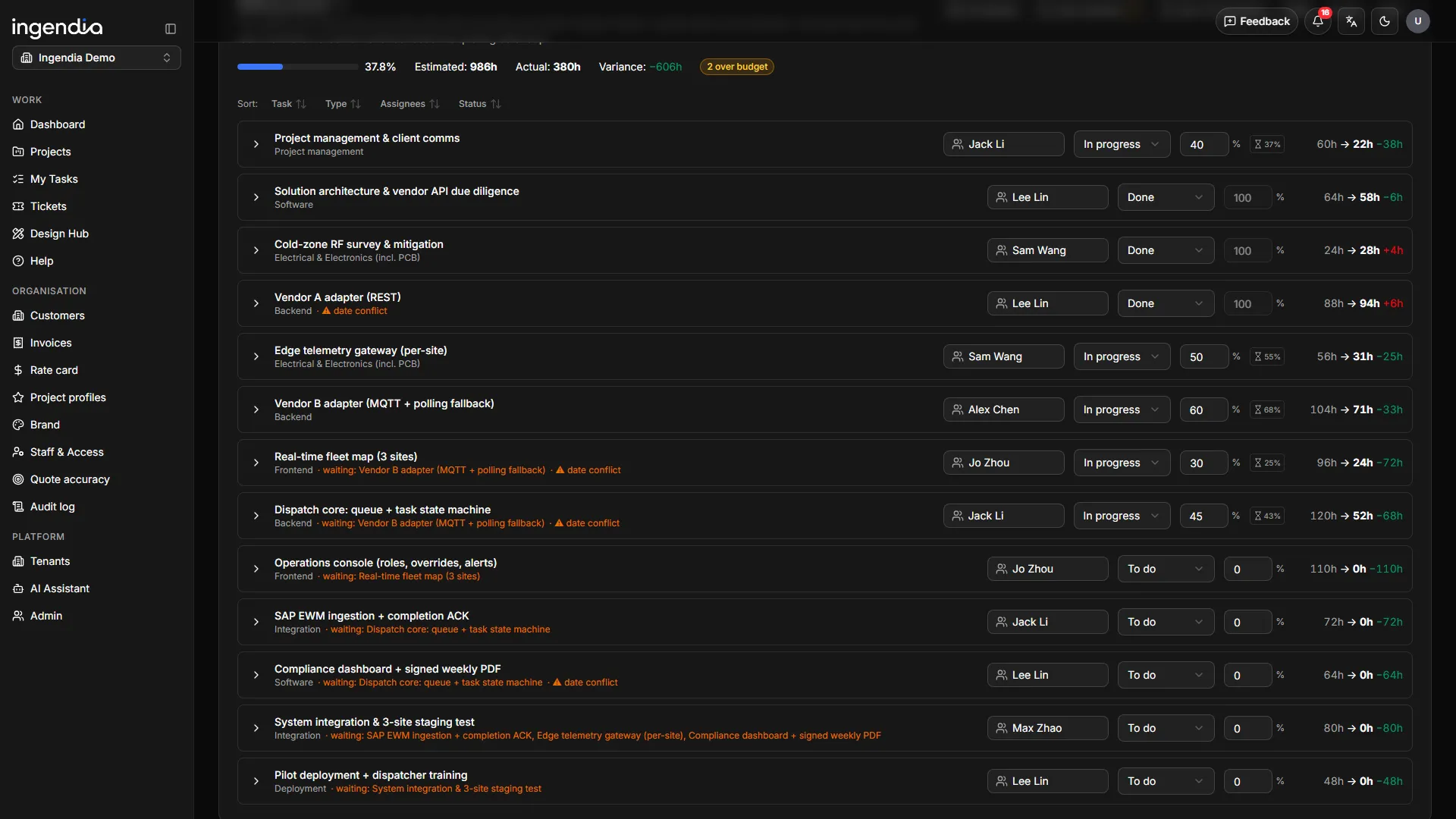 See the real screenDelivery on a board, against the promise
 Document generation
Every formal document, generated into your own masters
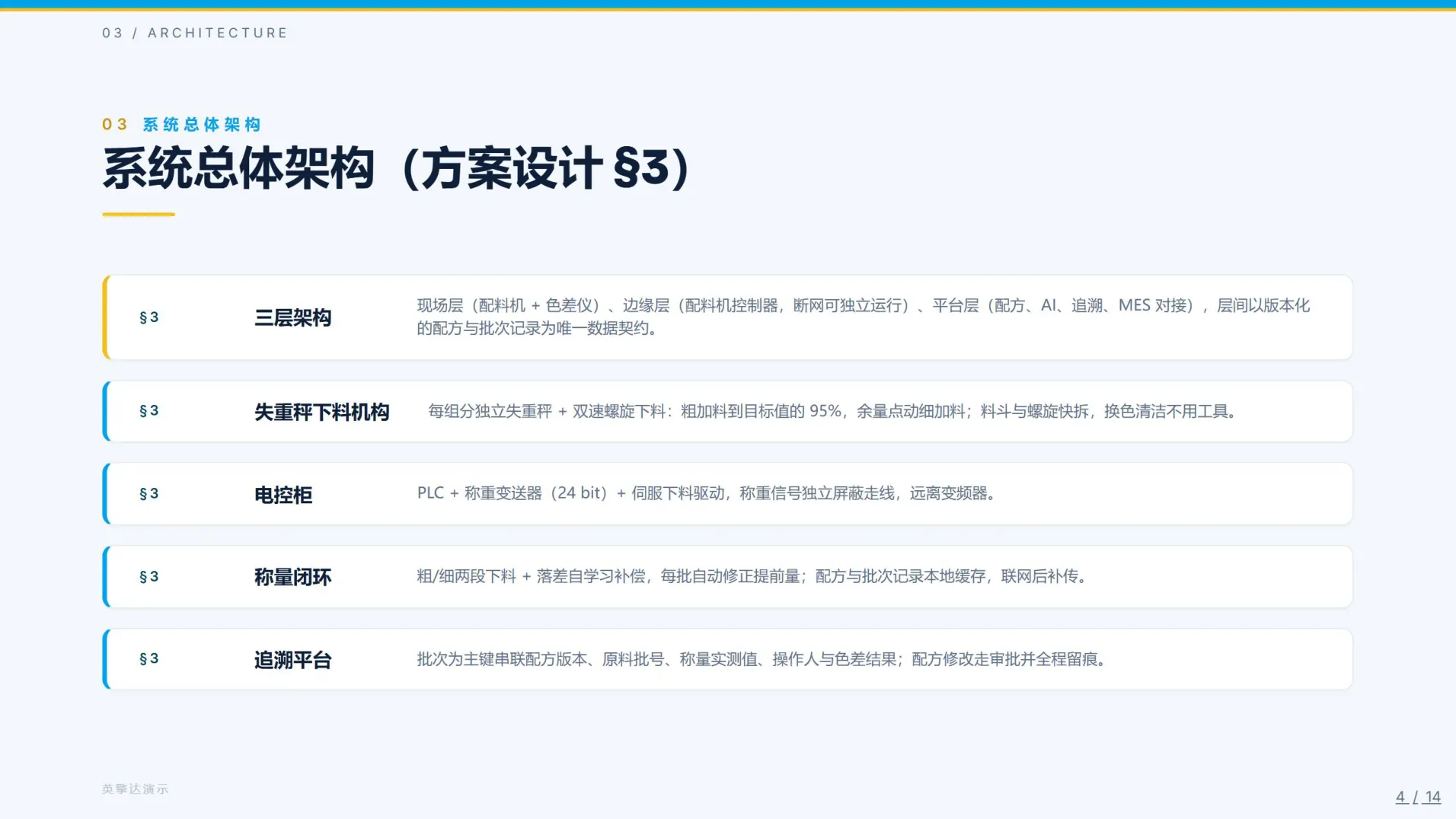
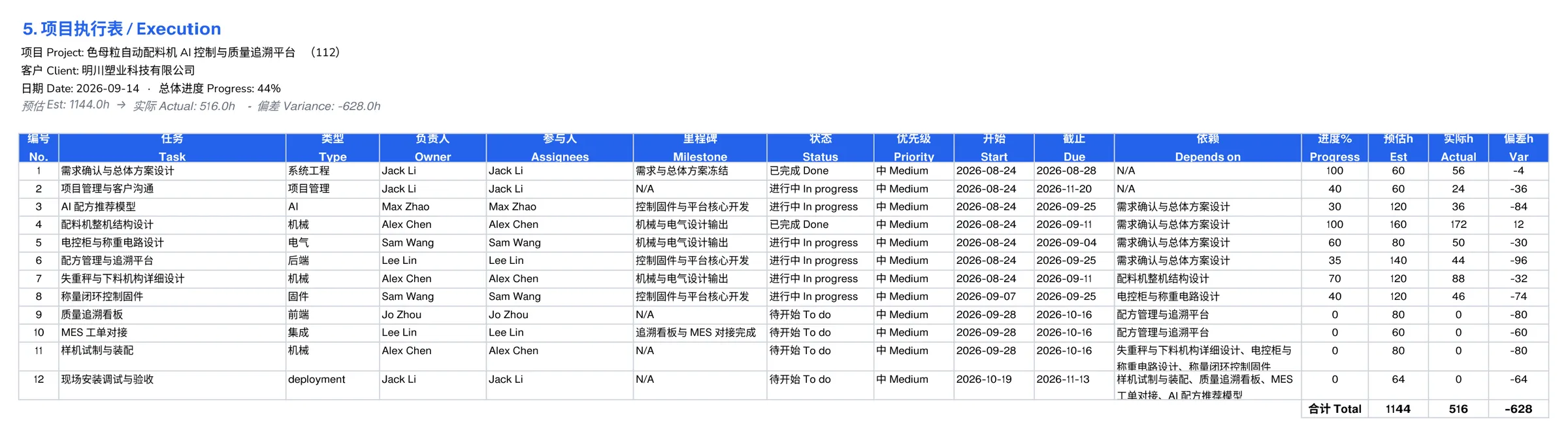
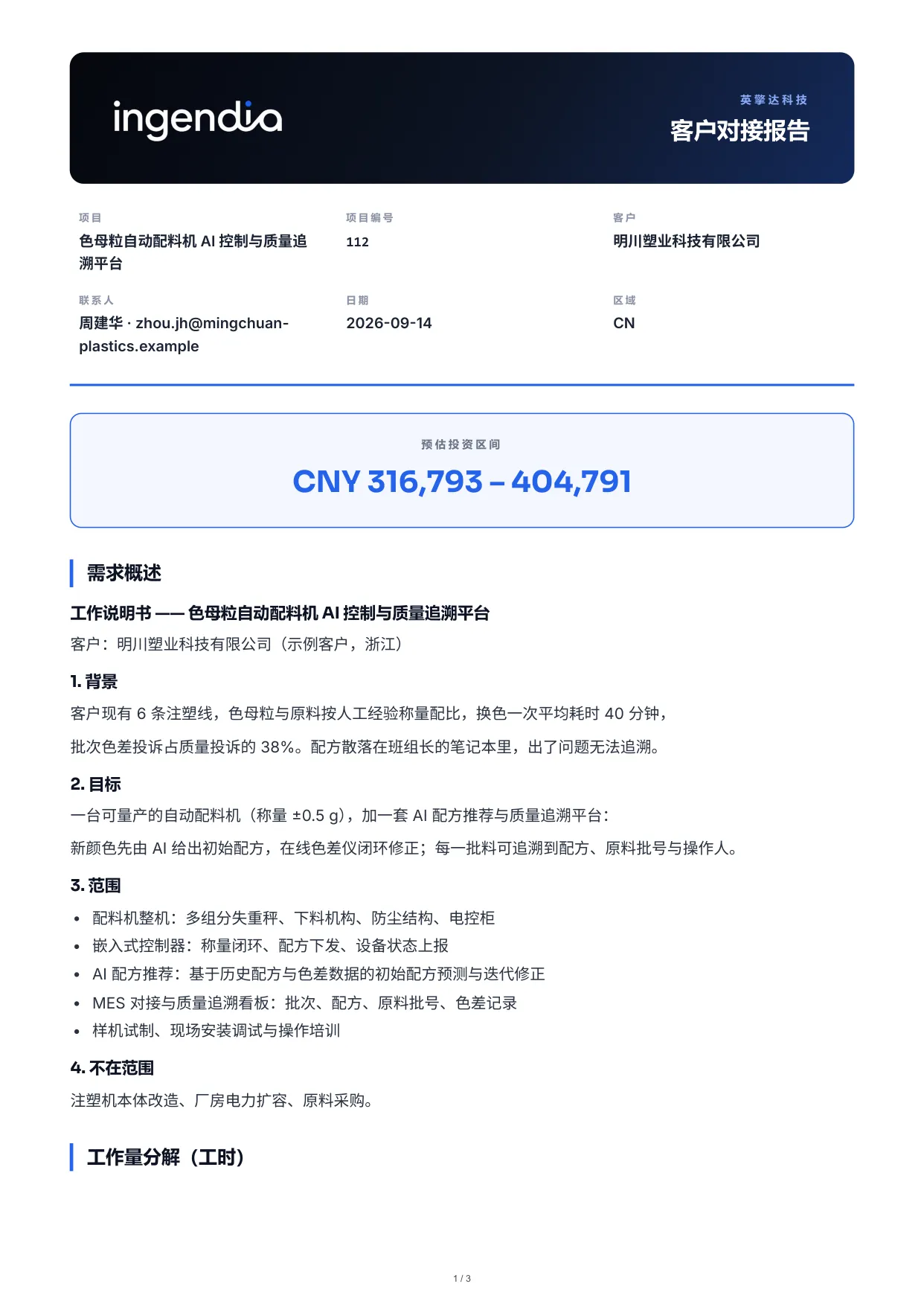
The documents a project owes — to the client, to the reviewer, to the file — are generated from the record rather than retyped from it, and rendered into your organisation’s Word, Excel and PDF masters with the title page and control sheet already on them.
- Proposal PDF, and a client brief PDF with scope, effort and a price range but no line costs
- Requirements §2, design §3, or both in one Word report — numbered into the register
- Execution workbook: milestones, task list, design outputs and Gantt
- Priced workbook in client, reviewer and internal editions — cost exists only in the internal one
- Open-questions list as Excel, the delivery pack as a ZIP, and report decks from Deck Studio
-
The project record
§2, §3, the quote, the schedule
-
Your own masters
Title page and control sheet included
-
Proposal · client brief
PDF
§2 + §3 report
Word
Execution & priced workbooks
Excel
Report deck
A client edition never carries a figure the client is not meant to see.
Documents & control
A register that behaves like a controlled document system
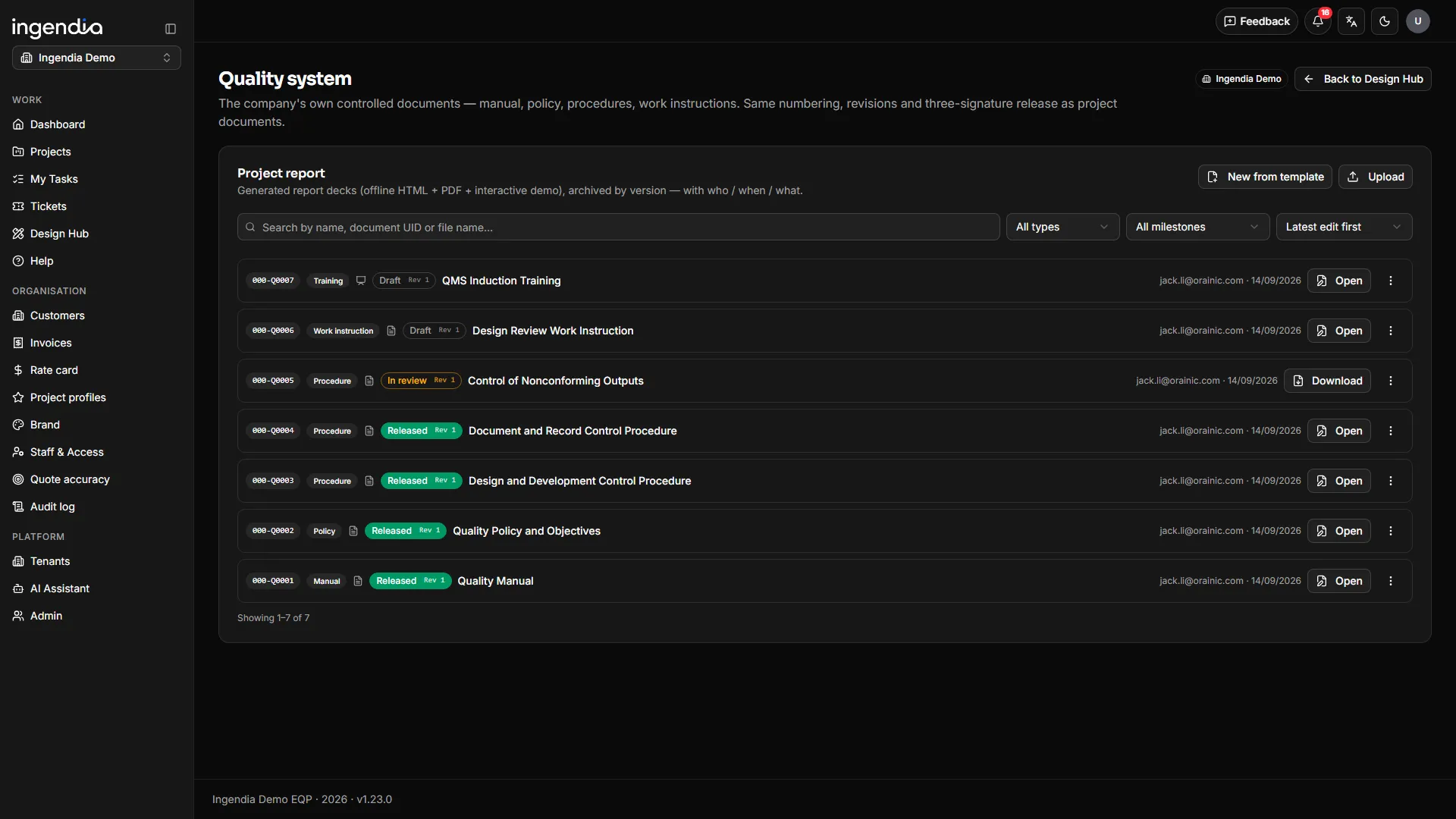
Every artifact — deck, report, drawing, workbook, or a SharePoint address registered without moving the bytes — gets a permanent number in the project register. Content changes under that number; the number never does. Company quality documents use exactly the same register.
- One document UID per document, all versions beneath it, searchable and filterable
- Draft → submitted → reviewed → released, with the reviewer and approver named and notified
- Prepared ≠ reviewed ≠ approved, enforced: no self-review, no editing under approval
- Release stamps the three sign-off names into the file and freezes the revision
- Edit Word / Excel / PowerPoint in Office for the web and save back as the next version
- Your quality manual, policies and procedures in the same register — read in one language or two side by side
-
Number first
From a branded template, before a word is written
-
Prepared
The author of this version
-
Reviewed
Anyone but the author
-
Approved
Authority to release, and neither of the other two
-
Released
Three names written into the file
The revision is frozen
The next upload starts a new revision under the same number — the released copy stays exactly what was signed.
 See the real screenA register that behaves like a controlled document system
 Customers & invoicing
From the quote to money in the bank
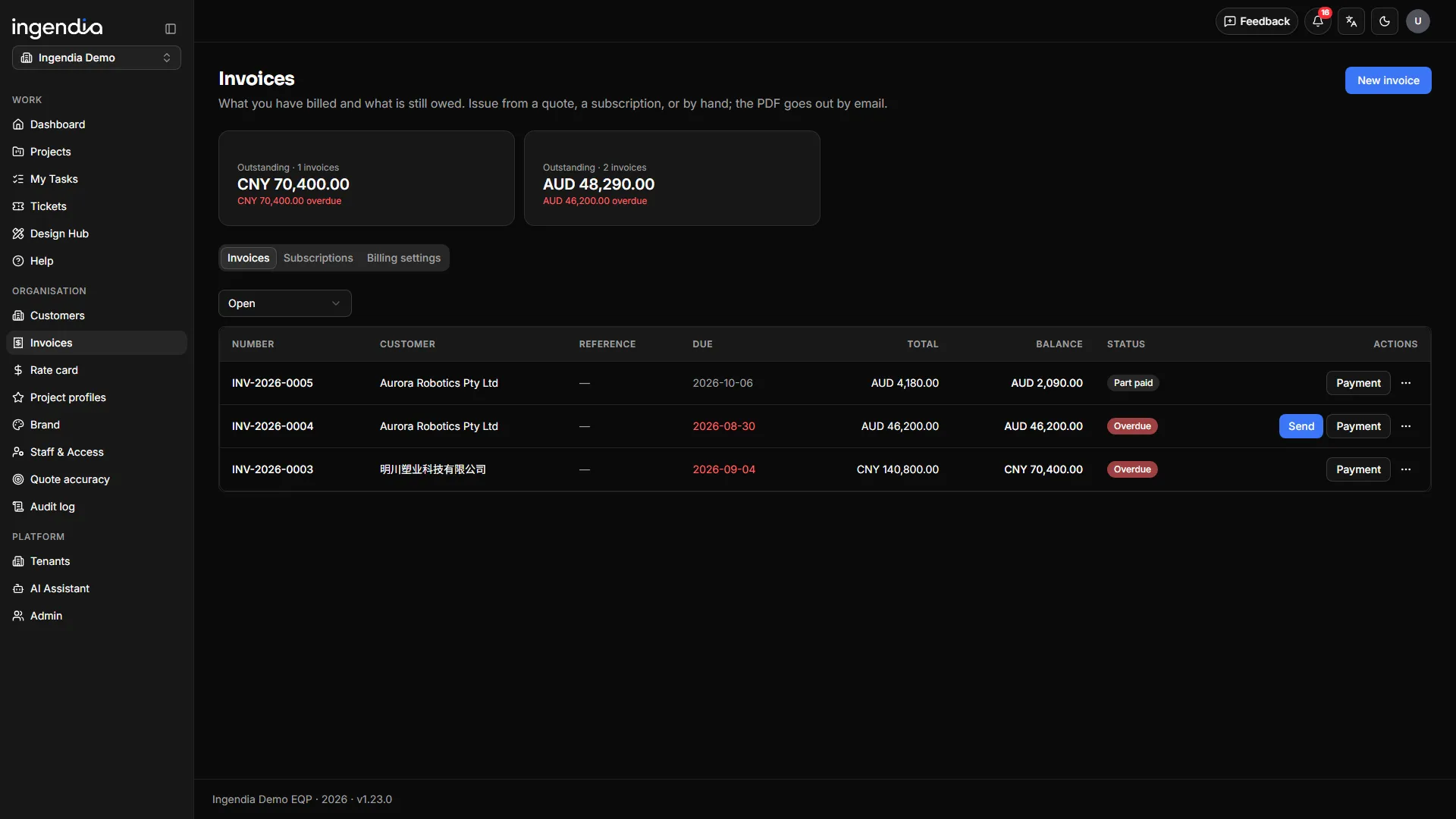
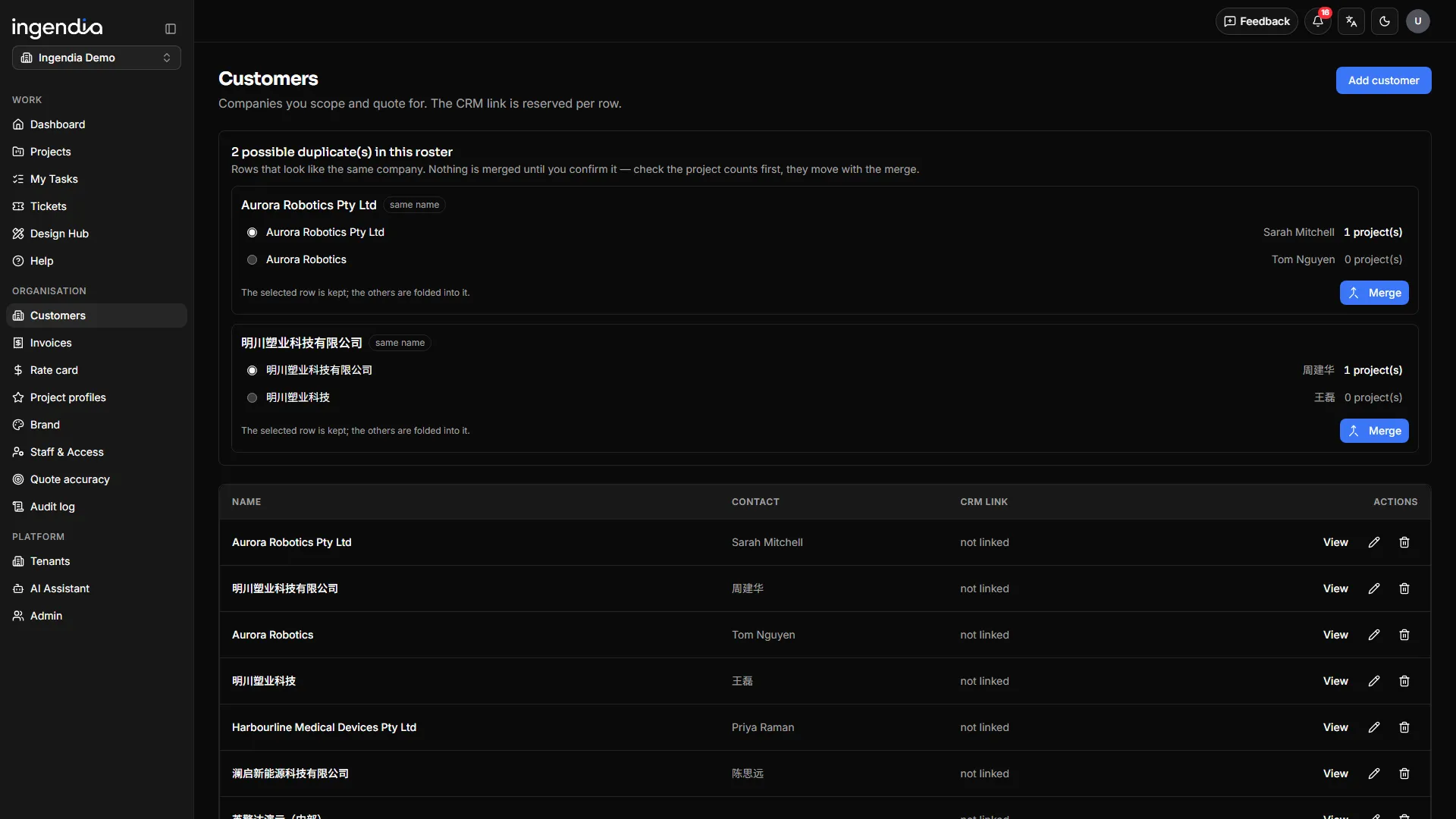
Invoices live beside the quote they come from and hang off the customer, so an organisation with no engineering work can bill straight from its roster too. The roster keeps itself clean: duplicates are proposed, and a person merges them.
- Draft → issued → sent → part-paid → paid, plus void; overdue computed from the due date
- Numbers per organisation per year; amounts, both parties and the bank account frozen at issue
- The email is the invoice: the PDF plus a tracked download link
- Payment schedules become instalment invoices; purchase orders recorded with number, amount and date
- Subscriptions issue themselves once per period, and send themselves if you choose
- Duplicate customers proposed and merged; a customer with projects cannot be deleted; projects re-file cleanly
-
Quote
Its payment schedule
-
One invoice per instalment
Numbered per organisation per year
Frozen at issue
-
The email is the invoice
PDF + a tracked download link
-
Paid
Recorded by a person
Subscriptions issue themselves once per period.
Design Hub
Seven AI drafting tools, engineering to a standard, and the checklists engineers actually open
A growing shelf of design tools beside the project work. The drafting tools turn a tender, a client’s sketch or your own delivered design into real documents — each filed as a draft, released only through review and approval. Beside them sit the tools that answer to a standard, each signed off or printed as a record.
- Tender compliance matrix and tender technical response (beta)
- Patent disclosure, concept 3D, diagrams, Deck Studio and client review packs (beta)
- V&V plans and DFMEA, drafted by AI and confirmed field by field by engineers (beta)
- EN 50155 assessment and the EN 50124-1 clearance & creepage calculator (beta)
- Cable sizing to AS/NZS 3008.1.1:2025 (beta) — and a PDF calculation record from every calculator
- Standards by domain — electrical, railway, medical — beside your firm’s standards library (set up per firm), linked from your document system
- Design review (eTAR) checklists with photos, design deliverables by stage, company file templates and the quality system
-
Your project record
§2, §3, BOM, tenders, sketches
-
Seven drafting tools
Tenders, patents, diagrams, decks, concept 3D, review packs
Assurance worksheets
V&V plans · DFMEA · EN 50155
Standards calculators
EN 50124-1 · AS/NZS 3008.1.1
-
An engineer answers for it
Documents and worksheets: reviewed and approved by others
Calculators: a PDF record, recomputed on the server
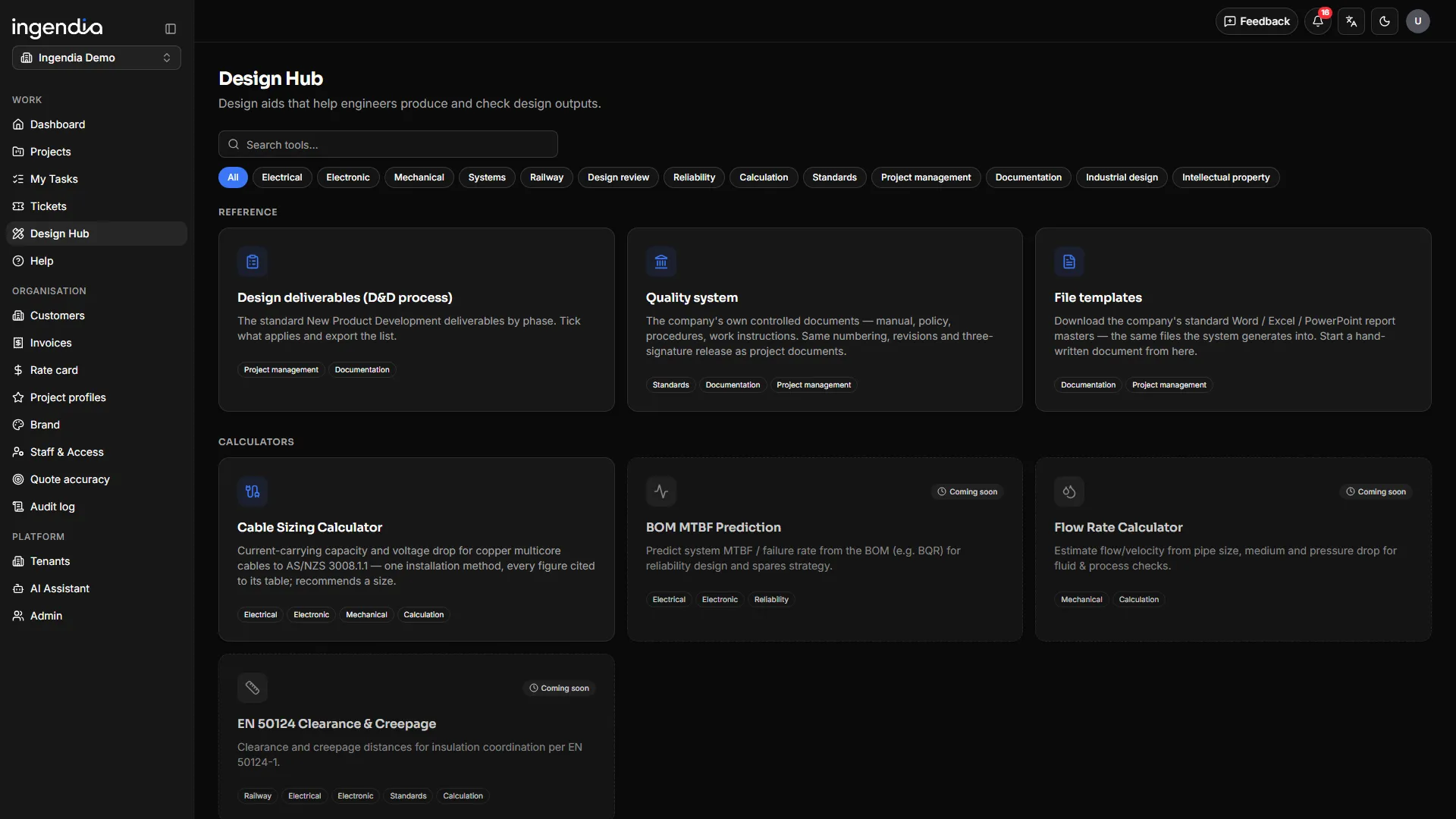 See the real screenSeven AI drafting tools, engineering to a standard, and the checklists engineers actually open
 Operations
Multi-brand, multi-region, audit-ready
Run several organisations on one deployment — each with its own brand, document masters, rate card and roles, and each seeing only its own data. Platform and tenant roles compose cleanly, and every action lands in the audit log.
- Multi-tenant with per-org branding; each brand pinned to its own Word / Excel / PowerPoint master
- The navigation is the permission model: a PM runs their own projects, an org admin runs the organisation, with a deputy PM per project
- Personal queues: my tasks, my deliverables, documents waiting on my signature
- Bilingual UI and documents (English · 中文), with the output language pinned per project
- An AI engine per purpose and per tool — pin a model, or follow the design engine
- Full per-project audit trail for QMS evidence, plus an in-app manual on every page
-
Organisation
Its own brand, masters, rate card
Another organisation
Sees only its own data
-
The navigation is the permission
PM: own projects
Org admin: the organisation
-
Audit trail
Every action, per project
English and 中文, output language pinned per project · AUD · CNY · USD.
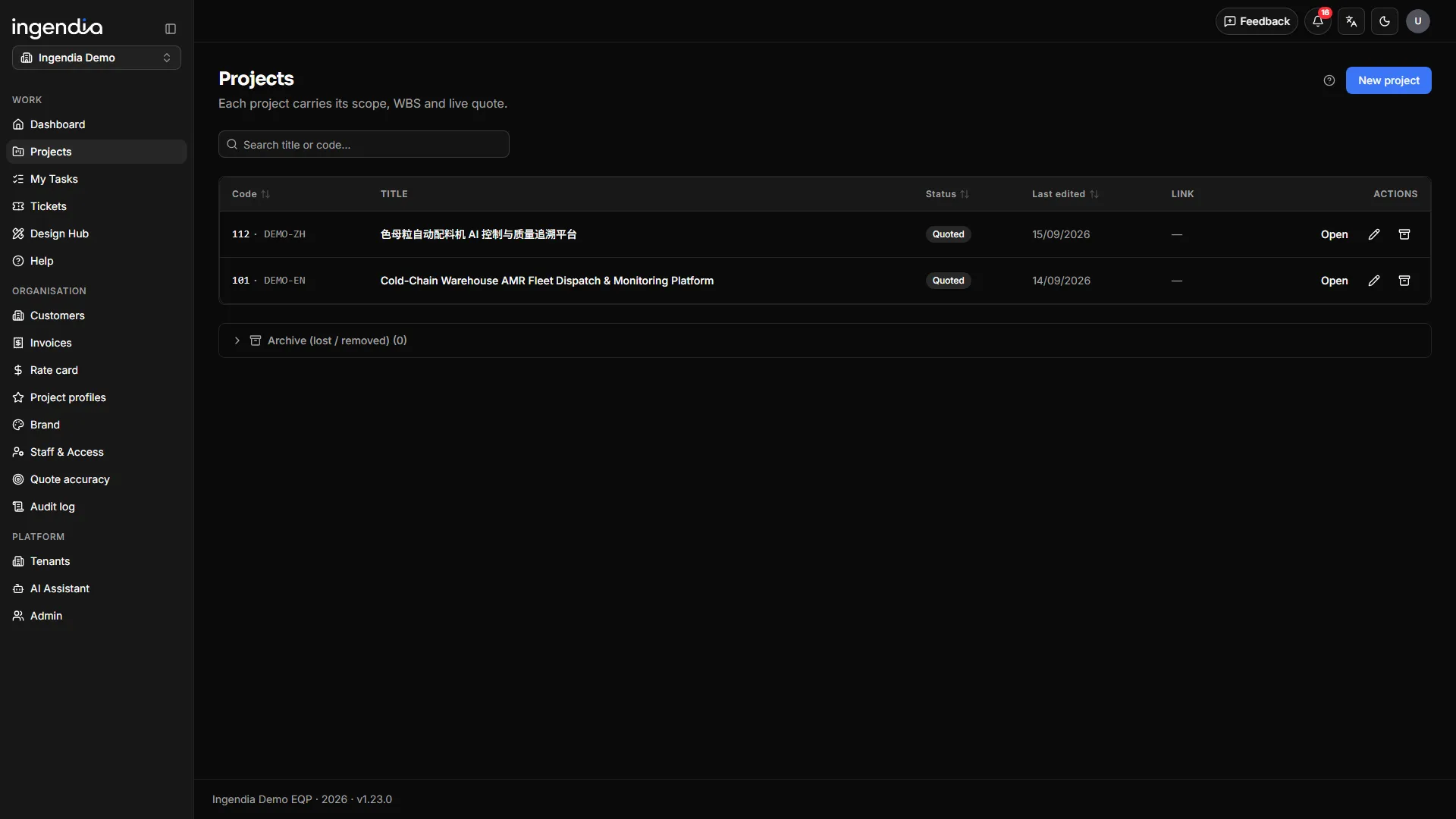 See the real screenMulti-brand, multi-region, audit-ready
 Describe your project. Get an engineered answer.
Type it, say it, or drop in a drawing — the intake takes minutes, and the analysis starts immediately.